Coaster Mockups: A Designer's Guide to Realistic Product Visuals
When you're building a brand, showing your work in context is everything. A flat design on a white background is one thing, but presenting your logo or artwork on a physical product instantly elevates its perceived value. This is where high-quality mockups become indispensable tools, and the Coaster Mockup PSD is a prime example of a resource that bridges the gap between digital concept and tangible reality. It’s not just a template; it’s a stage for your designs to perform on.
Understanding the Anatomy of a Professional Mockup
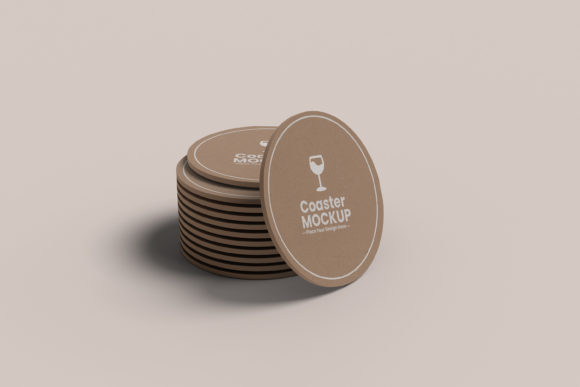
At its core, this Coaster Mockup is a layered Photoshop file designed for maximum flexibility and photorealism. The base layer features a high-resolution (4500×3000 pixels at 300 DPI) photograph of a coaster, capturing the subtle textures, lighting, and shadows that give it weight and presence. The real power, however, lies in its structure. A dedicated Smart Object layer acts as a placeholder for your artwork. This feature is the heart of the mockup's ease of use. You simply double-click the Smart Object layer, paste your design into the new window that opens, save, and watch as your artwork seamlessly wraps onto the coaster with perfect perspective, lighting, and texture. It’s an incredibly simple drag-and-drop process that eliminates the guesswork of manual warping and shadow matching.
Beyond the primary design placement, the mockup offers granular control over the scene's mood. Separate layers allow you to change the background color and the shadow color independently. This means you can adapt the mockup to fit any brand palette or campaign aesthetic without altering the core product presentation. Furthermore, the object and its shadow are on separate layers, giving you the freedom to adjust the shadow's opacity, blur, or even remove it entirely for a cleaner look. This level of control is what separates a basic template from a professional-grade design asset, ensuring your final image aligns perfectly with your creative vision.
Practical Applications Across Creative Projects
The versatility of a well-made coaster mockup extends far beyond simply previewing a circle-shaped logo. For graphic designers and brand strategists, it’s a crucial tool for client presentations. Instead of describing a brand application, you can show it. Presenting a logo on a coaster in a realistic setting helps clients visualize their brand in action, making the abstract concrete. This tangible demonstration can significantly streamline the approval process and build client confidence.
For entrepreneurs and small business owners, especially those in the food and beverage, hospitality, or events industry, these mockups are marketing gold. Use them to create compelling visuals for websites, social media profiles, and online store listings. A café owner can showcase their new branding on a coaster placed on a rustic wooden table, instantly conveying the establishment's atmosphere. A craft brewery can use the mockup to display label designs for a new seasonal ale, generating anticipation before the product even hits the shelves.
Content creators, bloggers, and publishers will find endless uses as well. A lifestyle blogger could feature a mockup with a custom quote or pattern to illustrate a post about home décor or personalized gifts. An author could use it to reveal the cover art for a new book in a unique, eye-catching way. The ability to easily recolor the background and shadow means you can create a series of cohesive social media graphics for a product launch, each with a slightly different feel but maintaining a unified brand identity.
Maximizing Impact with Smart Design Choices
Using a mockup effectively involves more than just plugging in a design. The goal is to create a harmonious scene that tells a story. When placing your design into the Coaster Mockup, consider the context. A minimalist, modern logo might look best against a clean, solid-colored background with a subtle, soft shadow to emphasize its simplicity. In contrast, a vintage or rustic design could be paired with a textured background, like aged wood or marble, and a more pronounced shadow to enhance its character.
The separate shadow layer is a particularly powerful feature. A shadow that’s too dark or sharp can make the object look artificially pasted on. By adjusting its opacity and color, you can create a shadow that integrates naturally with the chosen background, enhancing the realism of the scene. This attention to detail is what elevates a good design to a great one, demonstrating a professional eye for composition and light.
Finally, remember that the mockup is a starting point. Use it as a foundation to build upon. Combine it with other elements—like a coffee cup, a pen, or some scattered leaves—to create a richer, more contextual narrative. The high resolution of the file ensures that even when cropped or used as part of a larger composition, the image remains sharp and professional. By leveraging the full capabilities of this design asset, you move beyond mere presentation and into the realm of visual storytelling, making your work more memorable and engaging for any audience.