Organize Your Apparel Business with This Editable T-shirt Order Form
Running a custom apparel business, whether it's a side hustle, a local print shop, or an online store, often feels like a juggling act. Between managing inventory, fulfilling orders, and marketing your products, the administrative side can quickly become overwhelming. One of the most common pain points is keeping customer orders organized. A messy spreadsheet, scattered email confirmations, or handwritten notes can lead to missed details, incorrect sizes, and frustrated customers. This is where a dedicated system becomes invaluable, and a well-designed Editable T-shirt Order Form Printable is a foundational tool for that system.
More Than Just a Form: A Complete Management Toolkit
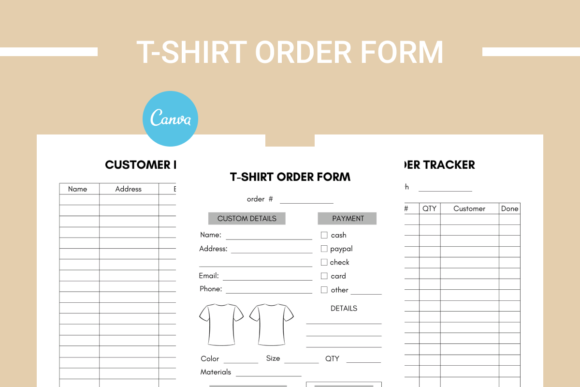
This isn't a single, static PDF. It's a comprehensive, three-page digital product designed to bring order to your entire order-taking process. The kit includes a primary T-shirt Order Form, an Order Tracker, and a Customer List. Each page serves a distinct purpose, creating a simple yet effective workflow. The order form captures all the necessary details from a client—their contact information, the specific design they want, the size, color, quantity, and any special instructions. The order tracker allows you to see the status of every order at a glance, from "pending payment" to "in production" and "shipped." Finally, the customer list helps you build a valuable database of your clients for future marketing and repeat business.
The true strength of this package lies in its editable nature. Delivered as a link to a Canva template, it puts you in complete control of the design. You're not stuck with a generic look. Using a free Canva account, you can change every element to match your brand identity. Adjust the fonts to reflect your personality, modify the color palette to match your logo, and even add your own shapes, icons, or a background watermark. This transforms a simple functional document into a piece of cohesive brand identity material. A professionally styled order form signals to your customers that you are organized and detail-oriented, which builds trust from the very first interaction.
Practical Applications for Entrepreneurs and Creatives
The utility of a structured order form extends across numerous scenarios. For the small business owner selling custom tees at local markets or pop-up shops, a printed stack of these forms provides a reliable way to take orders without relying on a phone or tablet. For the online creator or blogger running a limited merchandise drop, a digital version of the form can be shared via email or a link, streamlining the process for both you and your fans. Graphic designers and print-on-demand entrepreneurs can use the tracker and customer list to manage multiple client projects simultaneously, ensuring no order falls through the cracks.
Think about the real-world impact on your workflow. Instead of digging through emails to find a customer's size, you have it neatly logged in your tracker. Need to follow up on unpaid invoices? The order status makes it easy to filter. Planning a sale or a new design launch? Your customer list is a ready-made audience for direct outreach. This level of organization reduces errors, saves hours of administrative time, and allows you to focus on what you do best: creating and selling great products. The editable aspect also means the form can evolve with your business. As you introduce new product types or change your branding, you can update the template in minutes, ensuring all your design assets remain consistent.
Integrating the Form into Your Broader Brand Strategy
Every touchpoint a customer has with your business contributes to their overall perception. A clunky, confusing order process can undermine even the best product. Conversely, a clean, intuitive, and branded order form enhances the customer experience. It feels professional and considerate. This attention to detail is a subtle but powerful part of your marketing and branding strategy. It tells a story of competence and care.
When customizing your form in Canva, think about font pairing and visual hierarchy. Use a clear, legible sans serif font for the main body text where customers fill in their details—readability is paramount here. You might choose a complementary serif font or a stylish display font for headings to add a touch of personality. The key is to maintain a balance between aesthetics and function. The form should be easy to fill out, whether digitally or on paper, while still looking like it came from your brand. This is practical typography and design in action, applied to a tool that directly supports your business operations.
Ultimately, this Editable T-shirt Order Form Printable